OTAN Digest November 2026
Spotlight On...
The Continuous Improvement Plan for adult education agencies is now the Annual Momentum Plan.

OTAN is seeking input from adult educators to improve the new Annual Momentum Plan (AMP) Teacher Self-Assessment Survey. Join a focus group to review survey questions, share your perspective, and help ensure the survey accurately reflects the technology needs, strengths, challenges, and professional learning priorities of adult education teachers across California. Adult education teachers, instructional coordinators, professional development leaders, and administrators from WIOA-funded California agencies are encouraged to join one of two focus groups.
- Make your voice heard. Help shape a statewide survey that will inform technology planning and professional learning for adult education programs.
- Improve the survey experience. Provide feedback on clarity, relevance, response options, and missing topics.
- Support better AMP goals and professional development. Your feedback will help create a more useful tool for agencies and teachers.
The focus group will walk participants through the survey draft to evaluate question clarity, response choices, competency areas, and practical usefulness. Attendees will have the opportunity to identify potential gaps or redundancies and recommend improvements to supporting language and definitions.

Featured Resource: CREATE Edtech Technical Assistance (TA) Library
Register Now for the November 12 SoCal Canvas Summit
Bridging the Digital Divide: CDE, OTAN, and CDT Launch New Suite of Free Digital Tools
Empowering Adult Learners Through "The Change Agent" Publication & New Inclusive Series
2026-2027 Canvas Summits Coming to You
Registration for OTAN’s Annual TDLS Conference opened Monday 10/5/26
Explore the California EL Civics Exchange

Student Success Story
Meet Francisco Solano
Salinas Adult School | Nominated in 2023
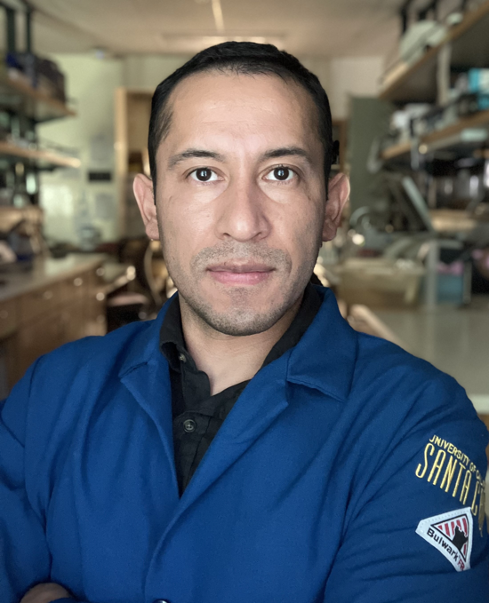
A 2023 California Adult Education Students Succeed Nominee
Francisco Solano is the epitome of the best of what adult education stands--a self-directed, self-valuing individual who has built/rebuilt himself under the most trying of circumstances and is still growing, integrated, contributing, and connected to the broader community.
After he got his GED, he enrolled in [the]local community college where completed 3 associate degrees before transferring to UC Santa Cruz. At UCSC, Francisco continued on his upward trajectory all the while staying connected to others around him by not only volunteering at Breakthrough, a men's community group, but also at the university in his cellular and molecular biology program. He's also been part of several programs and events that promote equity and inclusivity for Hispanic undocumented students, and has returned to my class many times to speak to and inspire those who are now in the same chairs he occupied. He has just recently been accepted into the doctoral programs at both UCLA and UC Davis where he has chosen to work on cancer research.
Featured Tech Tool – Unlocking the "Ask Gemini" Button in Chrome
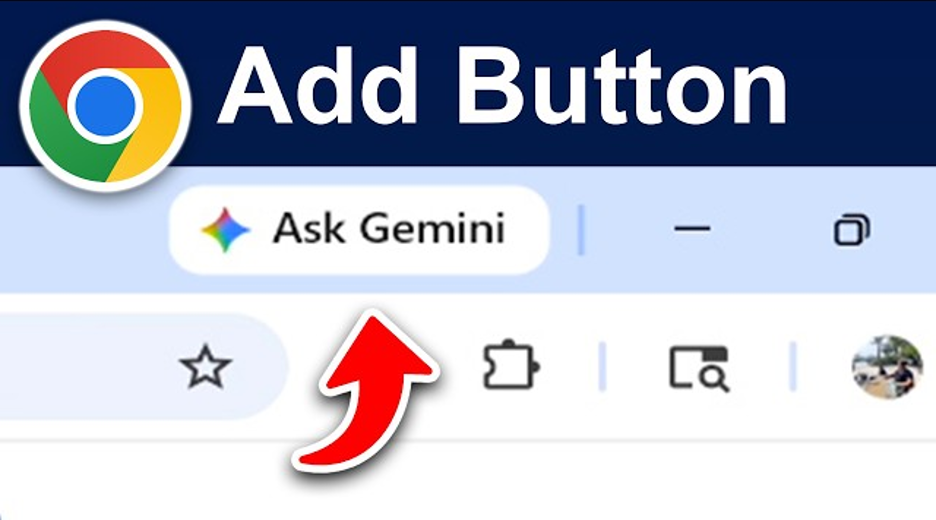
Look at the top-right corner of your Google Chrome browser window, next to your address bar and profile icon. Click Ask Gemini to open a side panel without leaving or refreshing your current webpage.
- Instant Differentiation for Mixed-Reading Levels: Finding authentic digital materials (news articles, government forms, health guidelines) that adult learners with lower English literacy can understand is difficult.
- How to use it: Open the article in Chrome, click Ask Gemini, and prompt: "Rewrite the main points of this article at a 3rd-grade reading level using short, simple sentences for ESL adult learners."
- Lesson Plan & Graphic Organizer Prep in Seconds: Limited prep time between evening or hybrid classes.
- How to use it: Open a resource page and ask: "Based on this page, outline a 15-minute warm-up discussion activity and create a simple T-Chart template (Pros vs. Cons) I can draw on the whiteboard."
- Live Vocabulary & Glossaries: Specialized terminology in workforce preparation or CTE (Career and Technical Education) materials, such as medical assistant terms, construction codes, or IT concepts can overwhelm students.
- How to use it: Keep a course article open and ask: "Extract 5 key vocabulary words from this page. Provide clear, simple definitions and an example sentence for an adult student for each word."

Monthly, SMEs write an article about technology and how it correlates with teaching and learning. These articles become companions of each OTAN Tech Talk. Have something to share? OTAN welcomes an article or Tech Talk from any adult educator in California.
November
App-solutely Effortless: Build Custom EdTech Tools with Claude Artifacts in Minutes
By Josh Eick, OTAN Subject Matter Expert
Now, with AI, you can create all of those things tailor-made to your materials, and, with Claude.ai Artifacts, you can turn those materials into engaging, fun, and dynamic interactive apps in just minutes!
October
Practical Strategies for Every Presenter
By Chris Vela Che, OTAN Subject Matter Expert
Have you ever given a presentation or taught a lesson and noticed that some of your audience members are looking at their phones, checking their laptops, or showing other signs that they’re losing focus? If so, you’re not alone. Keeping an audience engaged can be one of the biggest challenges for any presenter or instructor.
September
Work Smarter, Not Harder: Streamlining Slide Decks with Gemini AI
By Susan Gaer, OTAN Subject Matter Expert
Worry no more. With Gemini’s integration, it is now easy to create beautiful slides with gorgeous backgrounds. So let’s start off with some tips and tricks for making good slides.
Voices from the Field
Hear what Nikki Rae Hart shares about HyFlex classes at her agency.
Nikki Rae Hart
Adult Education Program Director, Inyo County Office of Education
What has the experience of implementing HyFlex been like for instructors and students? What has gone well, and what challenges have you had to address?
Satellite Classrooms have been the best part to come out of our HyFlex instructional model. We’ve found that students learn better when they are physically in a classroom and can develop a sense of rapport and camaraderie with their classmates. Zoom is an excellent option for students who cannot get to a classroom, but not everyone is comfortable enough with computers and Zoom to use it as a learning tool. Having an in-person class where students can participate and be part of their own community has become an integral part of our HyFlex model.
Many students can only attend one of the scheduled class times, so recording each class and making it easily available in Canvas has been critical to the success of the asynchronous, or “Flex,” part of our model. We encourage these students to form study groups and make our location, computers, and internet available to them. These groups allow students to practice their skills with partners and in teams, creating a learning community that continues beyond class time. In this way, our HyFlex English classes almost become syndicated. Before we began building Satellite Classrooms, every instructor teaching ESL had a full semester to learn the equipment, which proved essential to the model’s success. Nothing will turn a student away faster than watching a teacher troubleshoot technology for the first time. As new teachers join, we make sure they have ample training and opportunities to observe before leading their own HyFlex classes so they can deliver a seamless experience for students—whether in person, remote, or asynchronous.
What equipment or tools have been most important for launching HyFlex programming, and what have you learned about setting up and maintaining them?
Our program uses two 85-inch Samsung screens—one interactive smart board and one noninteractive display used specifically for participant videos. They are wired together with a Poly 70X system that integrates with Zoom. The interactive board connects to a laptop that the lead teacher uses to manage the Zoom session, while the Poly controls the second board to display participant videos. A satellite classroom logs on only through the Poly controller, which shows the presentation on the interactive board and participant videos on the noninteractive display. While the equipment carries much of the load in our Satellite and HyFlex classes, success also depends on having a dynamic lead teacher who can engage students across time and space, and a Satellite Facilitator who supports learners on-site and communicates with the lead teacher. The role of our Technology Integrator is equally critical. Having this position filled by a dedicated staff member within our organization has been key to launching and maintaining the program successfully.
Our HyFlex model also depends heavily on Canvas, an intuitive learning management system that supports both remote and in-person learners. For our ESL classes, we use the Cambridge One curriculum, as each textbook includes its own Canvas shell course. These shells provide strong practice materials that mirror the textbook and allow asynchronous students to participate in discussions and partner activities. They are also highly adaptable, allowing instructors to add presentations, activities, and links to class recordings.
OTAN November and December Events
| Date/Time | Event | Location |
|---|---|---|
| Thursday, November 12 08:00 AM - 03:30 PM |
OTAN Regional Canvas Summit | Southern California ★ | Hacienda La Puente Adult Education - Willow Campus |
| Thursday, November 12 09:00 AM - 12:00 PM |
Federal Program Monitoring Program (FPM) Adult Education Office Instrument Training 2026-27 (Part 2: Live Question and Answer Webinar) | OTAN Online Webinar |
| Thursday, November 12 01:00 PM - 02:00 PM |
Northstar Digital Literacy User Group | OTAN Online |
| Friday, November 13 08:00 AM - 12:00 PM |
Beyond the Basics: Making Google Docs, Forms, and Sheets Work for You at Azusa Adult Education Center ★ | This session is a closed inservice for Azusa Adult Education Center |
| Friday, November 13 01:00 PM - 02:00 PM |
OTAN Tech Talk November 2026: App-solutely Effortless: Build Custom EdTech Tools with Claude Artifacts | OTAN Online |
| Saturday, November 14 09:00 AM - 10:30 AM |
What’s New in Canvas LMS? | OTAN Online |
| Monday, November 16 01:00 PM - 02:00 PM |
Unlocking Canvas Success with OTAN: Free Resources, Support, and Professional Development | OTAN Online |
| Tuesday, November 17 12:00 PM - 02:00 PM |
AMP Teacher Technology Survey Focus Group | OTAN Online |
| Thursday, November 19 08:30 AM - 11:45 AM |
Softskills Integration in Adult Education at Hacienda La Puente Adult Education ★ | This session is an inservice for Hacienda La Puente Adult Education |
| Thursday, November 19 12:00 PM - 03:00 PM |
AI and Standards for ESL Instruction at Tracy Adult School ★ | This session is an inservice for Escondido Adult School |
| Friday, November 20 08:30 AM - 11:30 AM |
Saving Time in Integrated AI Tools at El Monte - Rosemead Adult School ★ | This session is an inservice for El Monte - Rosemead Adult School |
| Monday, November 30 09:00 AM - 12:00 PM |
Creating a Well-Organized Canvas Course at Visalia Adult School, Part 2 ★ | This session is a closed inservice for Visalia Adult School |
| Saturday, December 5 09:00 AM - 10:30 AM |
Accessible by Design: Building Inclusive Canvas Courses | OTAN Online |
| Thursday, December 10 05:00 PM - 06:00 PM |
AMP Teacher Technology Survey Focus Group | OTAN Online |
| Friday, December 11 01:00 PM - 02:00 PM |
OTAN Tech Talk December 2026: USA Learns: A FREE Digital Resource for ESL and CTE Support | OTAN Online |
OTAN training events are OPEN to Adult Education staff.
★ = CLOSED, In-Service Training
Professional Development - Plan Ahead!
Did you know OTAN provides FREE professional development workshops to help Adult Educators integrate technology?
Think about scheduling OTAN Professional Development in the 2026-2027 school year. With a wide variety of technology topics from which to choose, OTAN training staff can provide in-person workshops or presentations at any approved California adult education agency or professional development event, either online or face-to-face with a computer lab or devices connected to the Internet.
All OTAN's workshops are provided at no cost!
Each session is hands-on - everyone will learn new skills related to technology or using technology that they can use in their adult education class or program. And all OTAN online or face-to-face workshops can be tailored to fit the needs of the requesting program. Select the links to see a list of the current online or face-to-face workshops and descriptions. If you don't see a workshop that is exactly what you need, contact OTAN - we'll work together to create a training that's best for you and your staff!
Need more information? Contact OTAN training staff anytime by phone at (916) 228-2580, or by email at support@otan.us.
To view workshops already scheduled, visit the California Adult Education Professional Development Calendar and search for workshops sponsored by OTAN. Don't miss out!