

Effective HyFlex Teaching Strategies for Adult Education
by Audrey Dierdorff
In the evolving landscape of adult education, the HyFlex (Hybrid-Flexible) model has emerged as a powerful instructional approach to meet the diverse needs of learners. By combining face-to-face and online learning, HyFlex empowers students to choose their mode of attendance – whether in-person, online synchronously, or online asynchronously – for each class session. For educators, the challenge lies in adapting curriculum and lesson plans to ensure that every student, regardless of their location, has equivalent access to high-quality instruction and learning outcomes.
The Foundation: A Review of HyFlex Design
To successfully adapt a curriculum for HyFlex, educators should follow the four guiding principles established by Brian J. Beatty:
- Learner Choice: Students decide how to participate daily, weekly, or by topic.
- Equivalency: All participation modes must lead to the same learning outcomes.
- Reusability: Artifacts from learning activities (such as class recordings) should be used as learning objects for all students.
- Accessibility: Students must be equipped with the technology skills and equitable access needed for all participation modes.
Engaging Students During Instruction
When delivering a presentation or lecture in person and online at the same time, it is essential to actively engage both in-person and online students to maintain a unified classroom environment.
- Alternating Participation: To ensure equitable engagement, vary the delivery of content by alternating between modalities; for example, if an in-person student is asked to read from the board, the next student called upon should be a student participating online.
- Inclusive Questioning: This principle should also apply to class activities and discussions. When posing a question, allow an in-person student to answer, followed by an online student who can either unmute to speak or have their chat contribution read aloud to the group.
- Collaborative Sharing: During in-class assignments, ensure that both modalities are represented when sharing results by having both in-person and online learners read their comments or answers.
- Synchronous Physical Activities: If conducting a physical activity—such as "stand up if the statement is true"—request that online students turn on their cameras. Stop sharing your presentation and display the remote participants on a large screen. This allows in-person students to see and connect with their online classmates during the activity.
Adapting Lesson Plans for Equal Engagement
Adapting a traditional lesson plan for HyFlex requires a shift in mindset toward simultaneous instruction. A key strategy is to pair in-person students with online students during group work or discussions. For example, a small group in the classroom can use a laptop and an OWL camera (a 360-degree camera/microphone) to include a remote peer in their conversation.
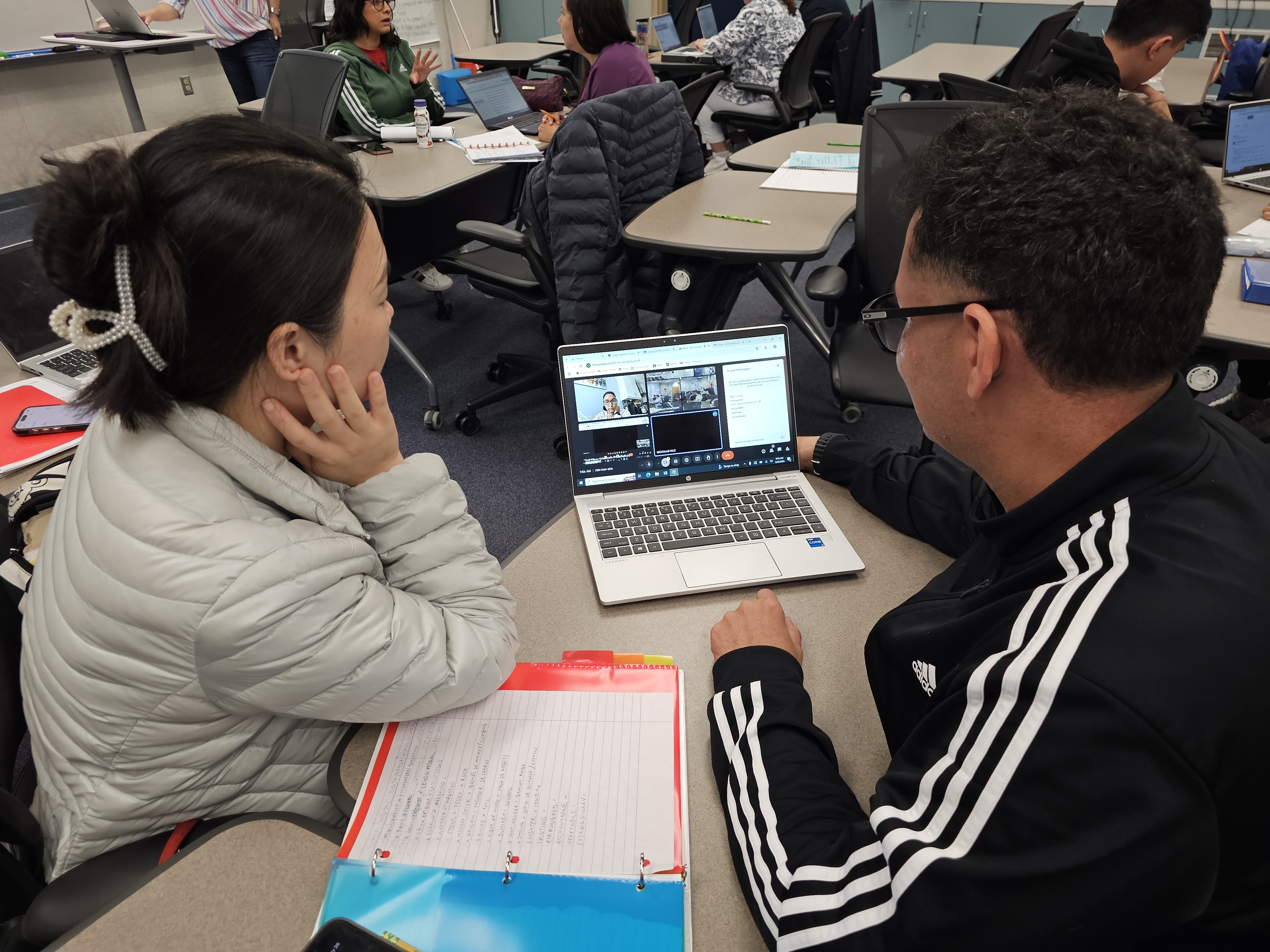
Educators should also utilize collaborative digital tools that work across all platforms. Instead of physical handouts, use Google Docs for group assignments; online students can work in Zoom or Google Meet breakout rooms while in-person students work in the classroom, with both groups contributing to the same live document.
Transforming Materials for Digital Access
Curriculum adaptation often involves digitizing traditional resources to ensure online learners are not at a "learning deficit".
- Scanning and Sharing: Teachers can scan print textbooks and present them on a Smartboard or projector while simultaneously sharing the document via email or Google Classroom.
- Virtual Manipulatives: For math instruction, utilize interactive tools like Blooket or virtual whiteboards for problem-solving so that online students can participate in real-time.
- Annotation Tools: Tools like Kami, the "Annotate" Chrome extension, or the PowerPoint pen allow teachers to mark up worksheets digitally, making the instruction visible to everyone on their respective screens.
Establishing Instructional Routines
Structure and consistency are vital for managing a multi-modal classroom. Implementing instructional routines—purposefully structured activities repeated from class to class—helps build student confidence and simplifies lesson planning. A sample routine might include a digital "Welcome" via chat, a vocabulary preview using Padlet or an online whiteboard, a collaborative reading activity with annotation tools, and a "Wrap-up" using Google Forms for an exit ticket.
Supporting Digital Literacy and Accessibility
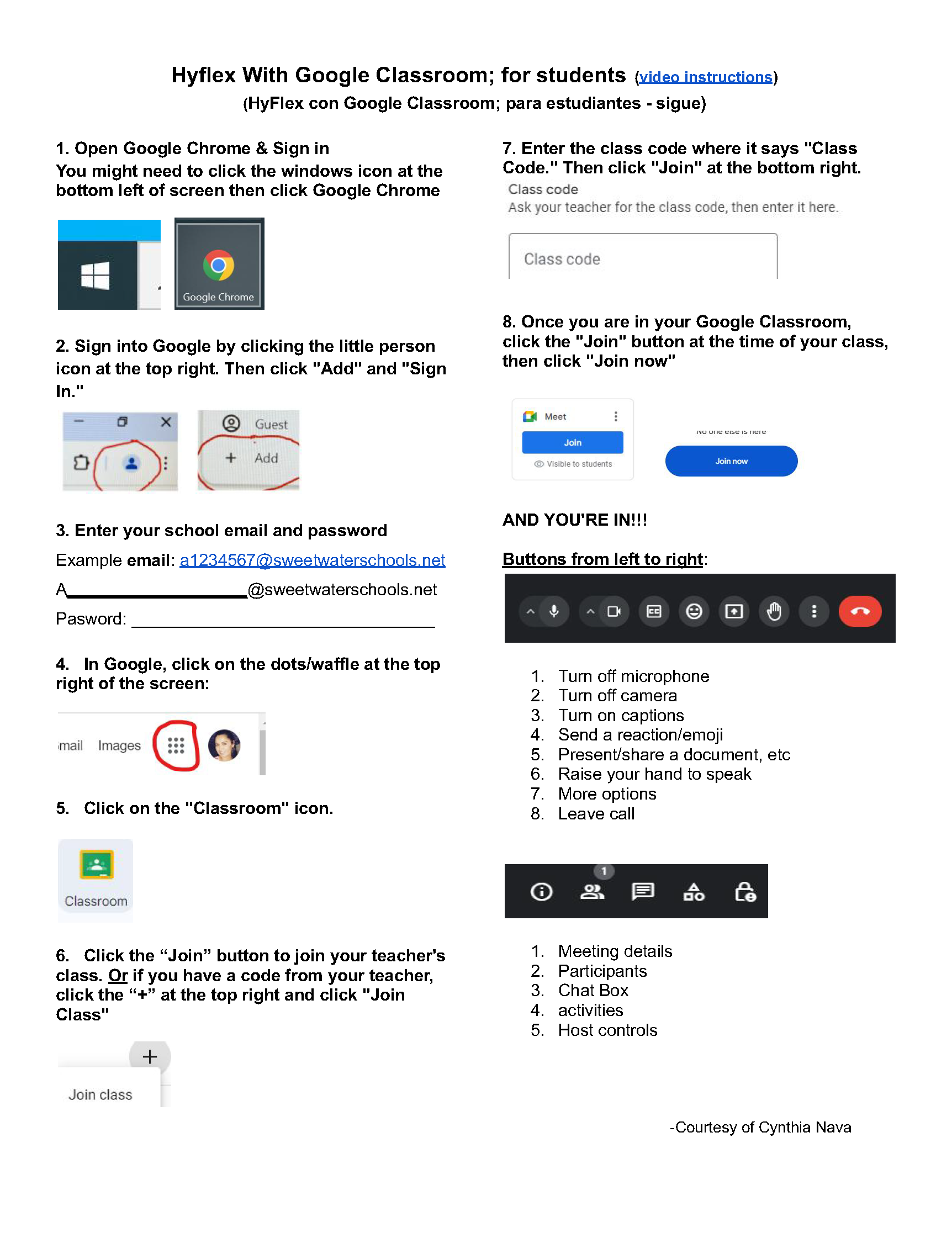
Equal access is only possible if students have the skills to use the required technology. Educators should provide pre-course technology orientation and step-by-step guides for accessing materials. Programs like Sweetwater Adult Education mitigate digital access gaps by offering student loan programs for laptops and hotspots and teaching key digital tools (like Google Workspace) as part of the core curriculum.
Example of a step-by-step guide for students:
Conclusion
While teaching in a HyFlex model requires more intensive preparation—as activities must be curated to work in-class and online—the benefits for adult learners are significant. By focusing on equivalency and reusability, educators can create a "no-barrier" environment that increases student retention and persistence, particularly for those balancing work, family, and education.